
Every delivery on one screen. Every route on your drivers' phones.
Route Drops is simple software for small courier and delivery companies. The dispatcher sees every order on a map and assigns it to a driver, and each driver gets their route on the phone in the best order.
No bank card needed, no contract. After the trial, €29.99 a month + VAT.
Everything you need for daily deliveries
No complicated setup: open it in a browser and start working.
Orders and map
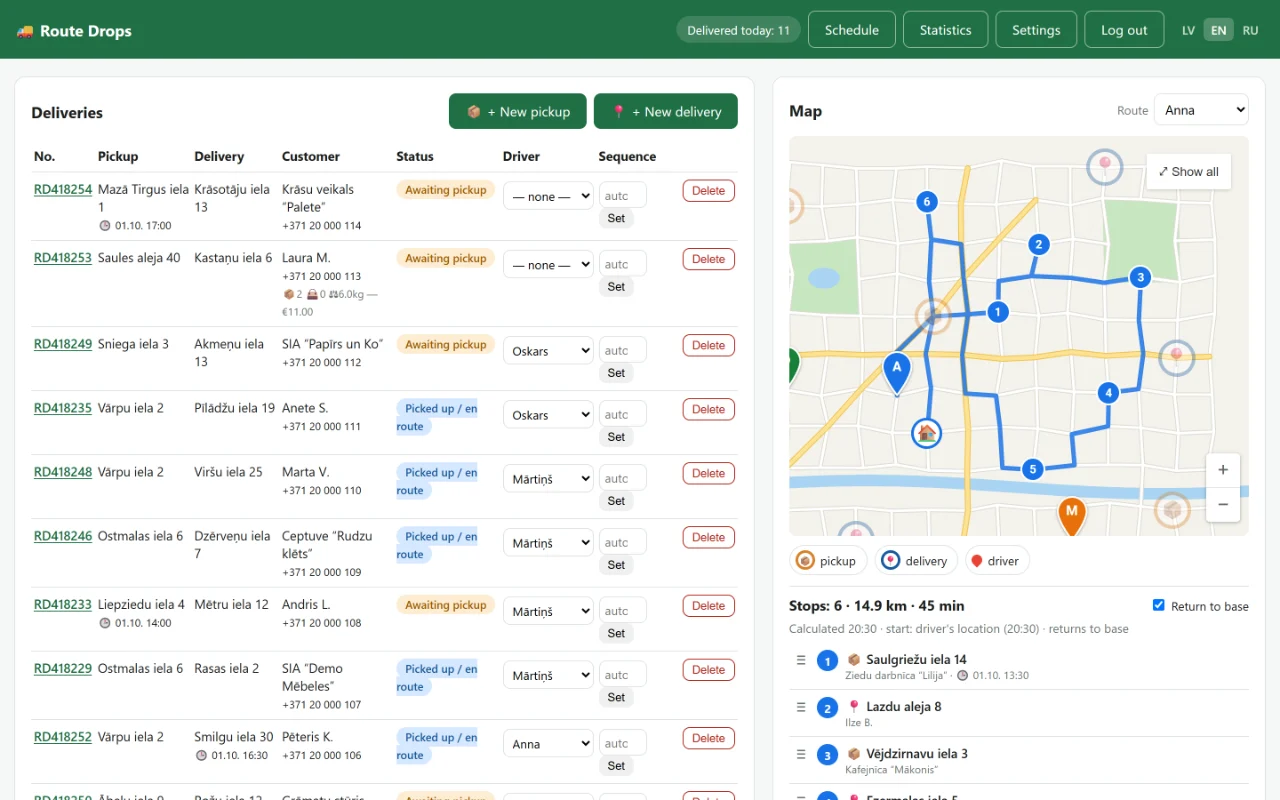
All orders in one table and on one map: what to pick up, what to deliver and which driver has it. The list updates by itself.
Routes in the best order
Route Drops puts each driver's stops in the shortest order. If you need it different, the dispatcher drags the stops into place.
Navigation with Google Maps or Waze
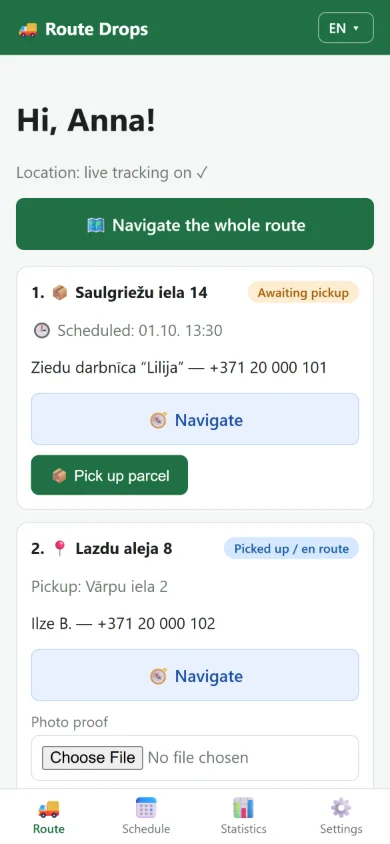
One tap opens the address in the driver's chosen navigation app. The whole route can be opened in Google Maps at once.
See where drivers are
While a driver has the route open on their phone, their location shows on the map. The map refreshes it every 15 seconds.
Stats and CSV for payroll
How many pickups and deliveries each driver did today, this week, this month or in any period. Download a CSV file that opens in Excel.
Order form for your customers
A link you can put on your website. Customers book a delivery themselves, the price is calculated automatically from the weight and your rates, and the order appears on your panel right away.
Three languages
Latvian, English and Russian. Every dispatcher and driver picks their own.
Works like an app on the phone
Drivers add it to their home screen. Nothing to install from the App Store or Google Play.
How it works
Sign up
Fill in a short form, and within a few minutes you have your own address, such as yourcompany.routedrops.com.
Add drivers and orders
Create logins for your drivers in the settings. Enter orders yourself or let customers book them through the form.
Drivers drive
Drivers see their route on the phone, tap “Navigate” and mark each pickup and delivery. You see it all on the map.
What it looks like
The screenshots use made-up demo data, and the map is an illustration. In the app the map is Google Maps.
Pricing
One price, every feature.
€29.99 per month + VAT
- Unlimited drivers and orders*
- 10 days free, no bank card needed
- No long-term contract: cancel your subscription at any time
- Your own address and a separate database
- Data stored on a server in Germany (EU)
* Within fair use. EU businesses with a valid VAT number are charged under the reverse charge.
Frequently asked questions
Do drivers have to install an app?
No. The driver opens a link in the phone's browser and adds it to the home screen. It works on Android phones and iPhones.
What happens after 10 days?
If you want to continue, add a bank card. Payments are handled by Stripe, and the subscription renews automatically every month. If there is no payment after the trial, the account is suspended.
Is there a contract or a minimum term?
No. You can cancel your subscription at any time.
How many drivers and orders can I add?
Unlimited, within fair use. One driver's route can be put in order automatically for up to 25 stops.
Will I see where my drivers are?
Yes. While a driver has the Route Drops route open on their phone, the location is sent automatically, and the dispatcher's map refreshes it every 15 seconds.
Which countries does it work in?
31 European countries. Choose your country and city in the settings, and addresses are searched there.
Where is my data stored?
On a server in Germany (EU). Every company has its own separate database. You can delete single orders yourself, and we delete the whole account when you ask: how to request deletion.